 Download
What is AI Transcribe in Noted?
AI Transcribe is a speech-to-text tool powered by artificial intelligence (AI – Whisper / Metal Model) that converts your audio recordings into text transcripts. It uses advanced machine learning to recognize speech patterns and convert spoken words into text.
How does it work?
1. Record an audio file or import one into Noted.
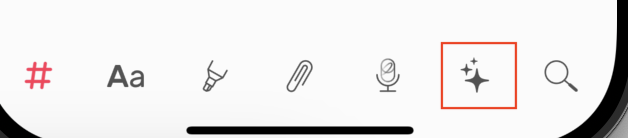
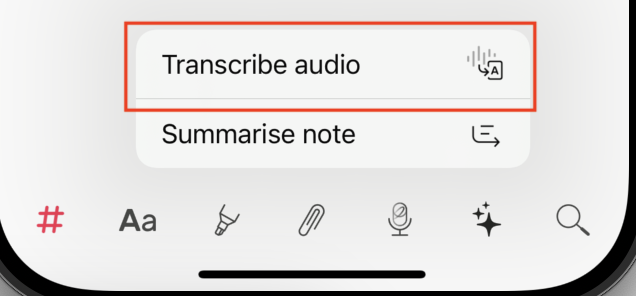
2. Tap the ✨ button on the bottom menu, and choose Transcribe audio.
3. Choose the Speech Recognition model you need, then download it.
4. Once downloaded, tap the transcribe icon again to begin transcription.
(Keep the app open on your screen to avoid interruptions.)
5. Watch as the transcription text appears as it processes your audio.
6. When it reaches 100%, you can seamlessly begin editing.
How accurate is AI Transcribe in Noted?
AI Transcribe is designed to quickly convert audio recordings to text, providing accurate results in clear, quiet environments. It also supports transcription in multiple languages, though accuracy may vary by language and clarity of speech
Why should I use the transcription feature in your app?
Our app offers on-device transcription, ensuring your data stays secure and private.
Does AI Transcribe work while recording?
No, transcription begins after recording or importing audio, not during live recording. Simply tap the transcribe icon to start transcribing after your recording is complete.
How accurate is AI Transcribe in Noted?
AI Transcribe aims for high accuracy, but factors like background noise, speaker clarity, and complex language can affect results. Our team is constantly working on improvements to make transcription more reliable across different environments.
How secure is the transcription process?
Transcription is processed on-device to ensure that your data remains secure and private.
How fast is the transcription?
Transcription speed depends on the length of the recording. Most transcriptions complete within a few minutes.
Is there a limit on AI Summary usage?
No. It is unlimited. No cap on audio length, recordings or words.
Does it support multiple languages?
Yes, AI Transcribe supports various languages, though accuracy may vary by language and clarity of speech.