




Your tutor says a new phrase. You write it down, but by the next lesson, you’ve forgotten how it sounded.
You remember the words, but not the pronunciation, rhythm, or context.
With Noted, you can tap any line in your notes to hear exactly what your tutor said, without replaying the entire lesson.
Here’s how to get more from every language lesson.

Four habits that help a lesson stick
1. Capture what matters. Note unfamiliar phrases, corrections, and words you struggled to pronounce. You don’t need to write everything down. Five useful phrases are enough.
2. Review the next day. Spend ten minutes revisiting your notes while the conversation is still fresh.
3. Practise out loud. Listen to the phrase, then repeat it. Try to match your tutor’s rhythm and pronunciation. This technique is called shadowing.
4. Keep your three hardest phrases. Bring them to your next lesson and practise using them with your tutor.
During the lesson: capture phrases as you learn
Start a recording in Noted and type in the same note as you normally would.
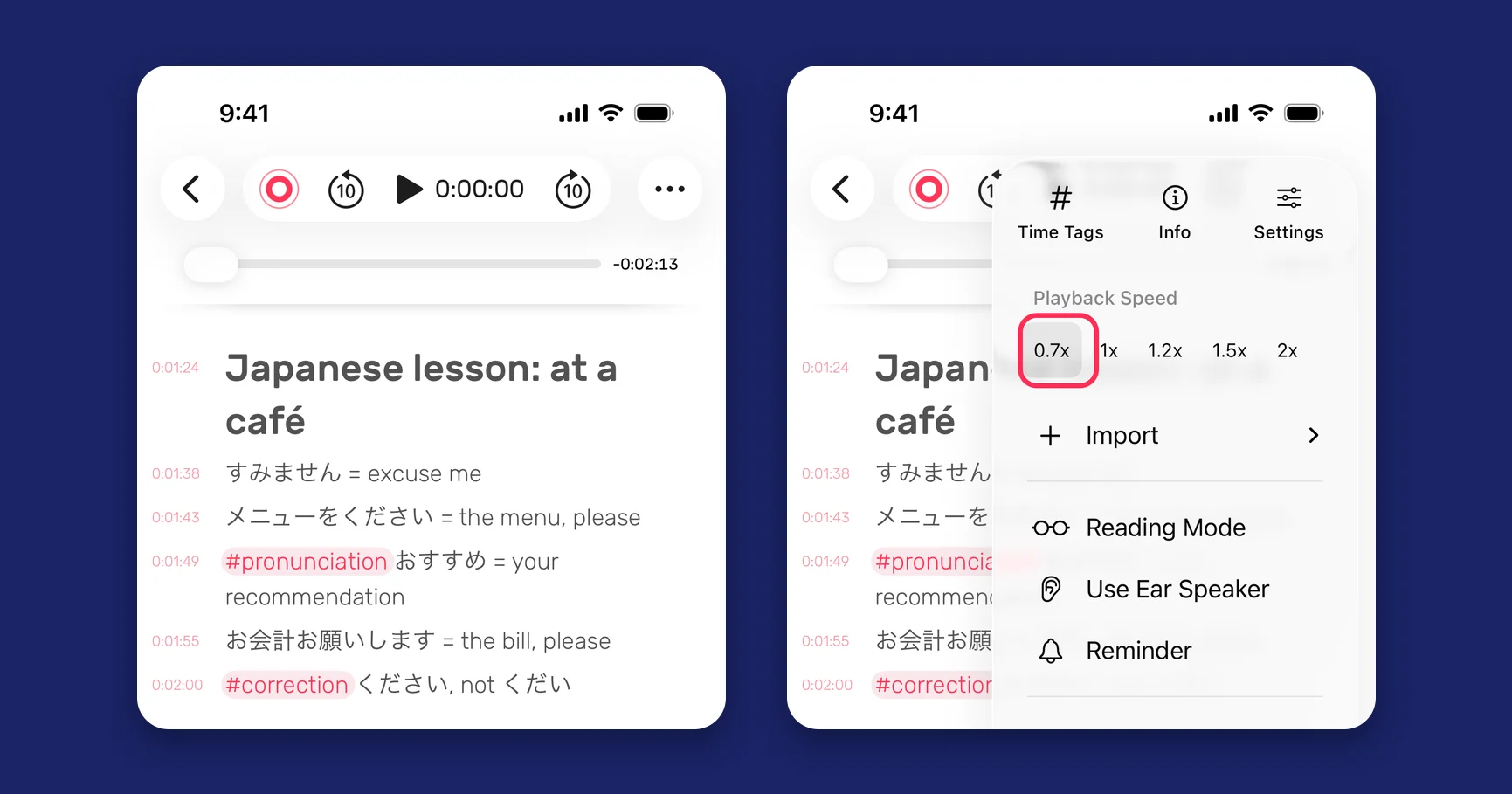
Every line you type is linked to its moment in the recording. Write a phrase the way you hear it, even if you’re unsure of the spelling. Later, tap the line to hear your tutor say it again.
To make important phrases easier to find, add tags as you go:
- #pronunciation for words you struggled to pronounce
- #correction when your tutor fixes something you said
- #phrase for expressions you want to use yourself
A tag ends at the next space, so keep it to one word.
After the lesson: replay and practise
Tap any line in your notes to jump straight to that moment in the recording. You’ll hear the phrase in context, including what came before it and how your tutor used it.
Need more time to catch the pronunciation? Slow playback to 0.7x on iPhone and iPad, or 0.25x on Mac.
Once you’re comfortable, listen again at normal speed. That’s the speed you’ll hear in real conversation.
Keep track of what you need to practise
Your tags appear in the Tags tab across your lessons. Open #pronunciation to find words you’ve struggled with, each one linked to the moment your tutor said it.
Use the list to practise before a test or bring it to your next lesson to check your progress.
Tip: Keep one notebook per language or course, so all your lessons stay together.
Make your next lesson count
Record your next lesson in Noted, capture the phrases you want to remember, and revisit them the following day.
Be present in the lesson. Hear it again whenever you need to.
For more help, see How do I change the playback speed of a recording? and How do I use #TimeTag in Noted?. No headphones on the train? Listen through your iPhone’s earpiece instead.
Get Noted on the App Store or Mac App Store.